Friday, May 29, 2015

FoMO: Why Fear of Missing Out Could Hurt Your Social Media Efforts


Fear of Missing Out (FoMO) has been described as "the fear of regret, which may lead to a compulsive concern that one might miss an opportunity." This fear can apply to missed social interaction, experiences, investments, new movies, apps, anything. Ultimately FoMO is fearing that we made the wrong decision on how to spend our time. I believe FoMO is pervasive among marketers, advertisers, entrepreneurs and business owners when it comes to social media. Fear of missing out on the latest social app or network can seriously hurt social media marketing efforts.


Some report there are over 800 social networks, apps and services. That number is overwhelming and it feels like there is a hot new social network popping up every other week. A couple of years ago it was Pinterest, then Instagram, Tumblr and Vine. Now it is SnapChat, Yik Yak, Yo, Meerkat and Periscope. What will be next? With the changes in social media happening so quickly, marketers and advertisers always feel left behind and like they must rush into every new thing.
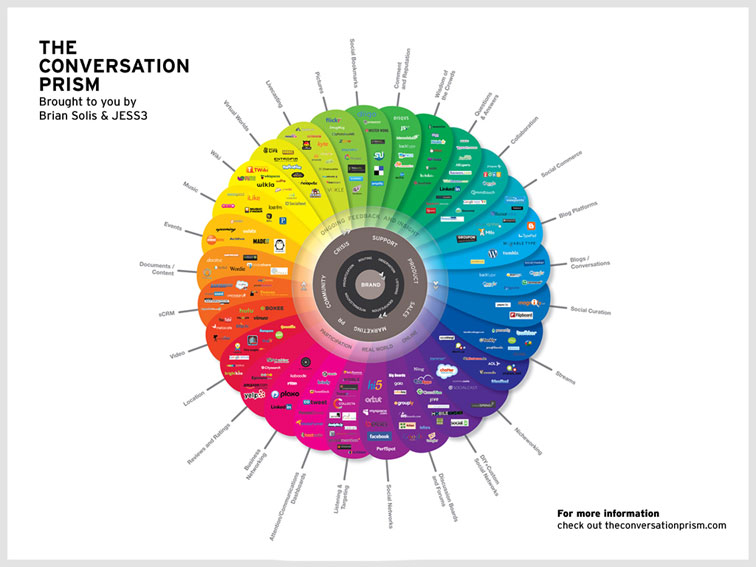
The truth is that you should never rush into any social media action because of FoMO. Any good social media effort should first start with listening. If you are jumping into SnapChat because it is the latest channel to get buzz in the press, how do you know what to say? How do you know what works? How do you even know your target audience is there? Did you ever meet someone who only talks about themselves and never listens? Fairly quickly you learn to avoid those people. The same thing can happen in social networks with businesses that rush to start talking in new channels.

You should also never rush into any social media action because social media results take time. Results only come from significant planning and time investment into creating valuable content. Despite all the talk of ROI and immediate measurement, social media marketing doesn't give immediate return, like a new TV campaign that can spike retail sales the weekend you run it. You must put in significant effort over time to see real results in social media. How much time?

Tom Martin from Converse Digital polled digital marketers and asked how long it takes to see results from social media marketing. Most respondents felt 6 months was a fair average, but only if you were doing it right. Comments to the post from people such as Joe Pulizzi of the Content Marketing Institute chimed in with time frames of 6 to 9 months or 12 to 18 months.

Susan Gunelius in an Entrepreneur article explains that successful social media marketing requires following the Law of Patience. She says, "Social media and content marketing success doesn't happen overnight. While it's possible to catch lightning in a bottle, it's far more likely that you'll need to commit to the long haul to achieve results."

Raffe at Transcending Social Media asks and answers this question in a different way. How long does it take for you to create a loyal following? Social media is all about engagement, relationships and listening. It can take months to curate a community by targeting them with articles, pictures, videos and other content that fosters engagement. Raffe concludes by saying, "Don't be fooled into thinking that because social media is an instantaneous means of communication that a community will simply spring forth from the ground. Your customers will support you, if you work at it."

Jaybird Social Media brings a dose of reality simply by saying, "If your social media consultant is suggesting that you can make it big overnight on the Internet, she is relying too heavily on the idea that memes and campaigns can go viral. Going viral is like winning the lottery." 

Hopefully by now you are feeling less fearful about missing out, but what does it mean to do social media right? Converse Digital suggests investing your time in three key areas:

1.     Invest in a solid strategy. Spend time to go through a social media marketing process. For example, always start with business objectives, target audience and listening.

2.     Invest in great content. People don't share "blah." What you create and share has to be excellent. It has to entertain, educate and simply be interesting to get shared online.

3.     Invest in quality people. Who is going to be the voice of your brand? Invest in experience and knowledge and training. No offense against college students, but don't put your entire brand's social presence solely in the hands of an intern.

Jaybird Social Media adds some great insight by saying you should spend your time on social media where your clients, prospects or customers spend their time. No need to jump on a trendy new network if your customers and prospects are not there. Jaybird also suggests optimizing your time with tools such as Hootsuite, Tweetdeck, Buffer or HubSpot.

In a past blog post I wrote about David Higdon, NASCAR's IMC Managing Director and how I heard him talk about the brand's remarkable overhaul at a conference. Through social media they were able to achieve amazing results and engage a younger fan base, but it was accomplished through a 3 year plan.

I am not saying that you shouldn't experiment with new social channels, but don't let FoMO rush you into to not taking the time to do it right. And don't let FoMO scare you into pulling needed resources from your existing social channels to rush to that trendy network or app. It reminds me of a saying from my advertising days that says, "There is never enough time to do it right, but there is always enough time to do it over." Do it right the first time and you won't miss out on anything.

Take a breath. Take a step back and listen before you leap. If you are not on any social networks yet then you probably are missing out. The good news is that by waiting you now have over 800 to choose from!

View the original article here


Original source: FoMO: Why Fear of Missing Out Could Hurt Your Social Media Efforts.
http://www.jretechnology.com

How to Start a Business Blog: Seven Essentials for Success


By Kristi Hines
Published May 19, 2015 Printer-Friendly

social media how to

Are you interested in starting a blog for your business?

Want to know how to set it up to get the best results?

There are lots of design and functionality options to consider when setting up your business blog. However, only a few make a vital difference in your blog's success.

In this article you'll discover the seven critical elements you need for your business blog.

seven essentials for a business blog Discover seven essentials for starting a business blog.

Here are the three most commonly used blog layouts:

Three-column layout with two sidebars and the main content columnTwo-column layout with one sidebar and the main content columnOne-column layout with only the main content column

There are advantages and disadvantages to each of these layout options.

If you're a publisher with a large amount of content that you want to promote alongside your articles, the three-column layout gives you plenty of space for promotion.

TechCrunch uses the three-column layout with two sidebars.

techcrunch 3 column blog design An example of a three-column blog layout. Image: Placeit.

While this layout can distract readers from the main article, it might also keep them on your website longer, as they'll have plenty of related content to click through to.

The main content and sidebar option doesn't distract too much and provides areas to promote your products or services, additional content, social profiles and email list opt-in forms. If you want readers to give 100% of their attention to your content, the one-column layout is the best choice.

The Zapier Blog uses the one-column layout with just the content.

zapier one column blog design An example of a one-column blog layout. Image: Placeit.

Of course, this doesn't leave you with room for promotion of additional information, except throughout or at the end of posts.

The most popular option out of all three layouts tends to be the two-column, main content plus sidebar layout. The key to making this layout work for your business is to ensure that the sidebar focuses on your business goals, with the most important elements at the top.

The Hootsuite Blog uses the two-column layout with a sidebar to the right.

hootsuite two column blog design An example of a two-column blog layout. Image: Placeit.

For example, if you want readers to opt into your email list, your email list opt-in box should be at the top of your sidebar. Follow it with links to your social profiles, top content and other information.

Most importantly, unless you're an affiliate marketer or a publisher that generates income from advertisers, don't give visitors any external links to leave your website, unless they point back to your main website.

No matter what layout you choose for your blog, make sure that it's mobile-friendly. Google recommends responsive design, which is a fluid layout that reshapes itself based on the size of the screen.

responsive design examples An example of a responsive blog design by StudioPress.

You should be able to find a responsive design or theme for whatever blogging platform you use, such as the StudioPress theme shown above. You can also use plugins, like WPtouch Mobile Plugin for WordPress, that give any blog a mobile-friendly design.

If you want to convert blog readers into email subscribers to promote your company's products and services, you need to have multiple opt-in forms on your blog.

There are several different ways to implement opt-in forms on your blog, and many tools to do it. Most email marketing software solutions offer a few different opt-in forms to choose from that you can add to your website using the provided code.

GetResponse, for example, has a Form Builder that lets you create forms to match your site design and place anywhere on your website.

get response form builder Use the GetResponse Form Builder to create an opt-in form.

SumoMe allows you to add a variety of opt-in forms to any website (not just WordPress). You can add a smart bar at the top of your website, a scroll box that appears at the bottom right of the website or a light box pop-up that appears over the website.

sumome scroll box example An example of a scroll box opt-in form by SumoMe.

OptinMonster allows you to add a variety of opt-in forms on any website (again, not just WordPress). You can add opt-in forms anywhere on your site, including the sidebar, footer, after a post, in floating bars, in slide-ins and in pop-ups.

optinmonster form example An example of a footer opt-in form by OptinMonster.

While you don't want to go overboard, with one opt-in form sitting next to or overlaying another, you do want to make sure that there is an opt-in form available so readers can subscribe at any time.

If you use WordPress, you can install free plugins like WordPress SEO to create key fields for all of your blog pages to optimize them for search engines. Once installed, start by adding the SEO title and meta description for your blog's homepage, optimized for specific keywords.

wordpress seo homepage title and meta How to configure the SEO settings for your blog homepage in WordPress SEO.

As you create pages and posts on your blog, remember to fill in the SEO title and meta description. You can even add these fields to your category and tag pages. Go to the appropriate menu items under the Posts section and click on the categories or tags you want to optimize for search.

categories and tags in wordpress How to find your categories and tags in WordPress.

Then use the fields to optimize them for specific keywords.

yoast wordpress seo settings How to optimize your tags and categories for search in WordPress SEO.

This tactic helps your blog get additional visibility in search for more keywords.

Social sharing buttons are a must for your blog post content. They make it easier for your readers to share your content on the social networks that matter to you.

If you're comfortable editing your blog design, you can choose to add the official sharing buttons from Twitter, Facebook, LinkedIn, Pinterest and your other favorite networks. These buttons pull the title, URL, description and an image (depending on the network) from the page they're installed on and allow visitors to share them.

If you'd rather use a plugin, there are a vast number of tools to turn to. Shareaholic, for example, works with most major website platforms including Bigcommerce, Blogger, Drupal, Joomla, Magento, Shopify, Squarespace, Tumblr, Typepad, Weebly, Wix and WordPress. It allows you to create share buttons for over 80 social networks in different configurations.

shareaholic share buttons Setting up social sharing buttons using Shareaholic.

There are also extensions like Filament that work on any website and allow you to create "flare" social sharing buttons that tally up your total shares across the social networks you've selected.

filament share buttons Social sharing buttons by Filament.

The advantage of using a social sharing platform (like Shareaholic, Filament or others) rather than installing the buttons manually is the analytics. Look for platforms that will help you learn more about how your content is shared and who shares it.

filament share analytics Filament social sharing analytics.

Also, be sure to experiment with the social networks you include in your social sharing buttons. You want to use the social networks that get the most shares and drive the most traffic to your content.

Besides social sharing analytics, there are several additional analytics tools you will want to set up on your blog to see how well your content performs.

First, start with Google Analytics. The Behavior reports show you details about the traffic your content receives.

google analytics top pages report The Top Pages report in Google Analytics.

Next, make use of Google Webmaster Tools. The new Search Analytics report shows you how your content performs in search based on the number of times seen, the number of clicks and the average position in search.

google webmaster tools report The Search Analytics report in Google Webmaster Tools.

You can also add SumoMe's Content Analytics, which will show you how many readers make it through each piece of content.

sumome content analytics report The Content Analytics report shows you how far readers get in a blog post.

Each of these tools can help you optimize your content marketing strategy to ensure that you're getting the best results from your blog posts.

If you have multiple people blogging for your company, whether they're employees, guests or freelance writers, create a new user account for each person. Platforms like WordPress allow each author to have a custom author bio with their posts and an author page that archives all of their articles.

author page on wordpress blog An author page created by WordPress.

In addition, when people search for the author in Google, they might stumble upon your blog.

author pages in google search results How author pages appear in search results.

If you have dozens of popular authors, this will allow you to get additional visibility in search and increased traffic to your blog.

Conclusion

There are many ways to set up a blog for your business. These tips will help you create a blog that gets specific results.

What do you think? What are the essentials that you have set up on your blog? Please share your thoughts in the comments!

(function(d, s, id) { var js, fjs = d.getElementsByTagName(s)[0]; if (d.getElementById(id)) return; js = d.createElement(s); js.id = id; js.src = "//connect.facebook.net/en_US/sdk.js#xfbml=1&appId=167506593384213&version=v2.0″; fjs.parentNode.insertBefore(js, fjs);}(document, 'script', 'facebook-jssdk'));About the Author, Kristi Hines

Kristi Hines is a contributing editor for Social Media Examiner, freelance writer, and HubSpot Inbound Certified Marketer. She specializes in analytics, blogging, and social media topics. Other posts by Kristi Hines »

View the original article here


Original source: How to Start a Business Blog: Seven Essentials for Success.
http://www.jretechnology.com

Thursday, May 28, 2015

How to Improve Your Google+ Marketing


By Ben Fisher
Published May 5, 2015 Printer-Friendly

social media how to

Are you marketing on Google+?

Do people pay attention to your messages?

In this article you'll discover five ways to strengthen engagement on Google+.

improve google+ marketing Discover how to improve your Google+ Marketing.

If your intent is to encourage engagement, writing a post that is formatted properly for Google+ is practically formulaic:

1. Create a post title that is no more than 40 characters long and use asterisks at each end to make it bold.
2. Summarize the post so the reader knows what to expect. Keep your summary close to 159 characters and you'll have exactly three lines of text, which ensures that most people will see the whole thing without having to click Read More.
3. Include a link to the destination post if you're using an image or video.
4. Add some personal insight (in your brand's voice) to create a connection with the reader. Ask a question or include a call to action to help boost your engagement.
5. Add three to five hashtags to improve discovery in Google+ and Google search.

formula shutterstock 198636392 Using the simple best practices of a formulaic post gives you an edge and makes it easy for your target audience to engage with you and share your content. Image: Shutterstock.

Just Guns, based in Sacramento, California, has a few challenges they've had to overcome to create their Google+ community. They don't allow transactions on their website so all business must be conducted at their store. To make matters more complicated, they have to limit their audience to 21 and older when it comes to Google+.

How can a brand page with so many restrictions engage with their target audience and see benefits? The answer is in the style of their posts. Just Guns consistently gears their Google+ updates toward educating their audience, while also providing entertainment. Each post is on-topic for their company and both people and Google can understand this.

Curious about just how well this tactic is working for them? Not only is their audience interacting with them regularly, Google Local drives over 2,000 visits a month to their website and more than 600 new calls a month to the company.

The key takeaway here is that while you can mix it up a bit, it's important to keep posts consistent and on-topic.

As a marketer, you're short on time. Managing both your brand page and your personal page can become time-consuming. However, by combining your efforts on both, you can extend your company's reach and reap great dividends.

The first step is to share your initial post to the company Google+ page, then share that Google+ update from your personal Google+ page (and ask your team to do the same). You could also link directly to the post from your personal page if you prefer.

stone temple consulting gplus post share CEO Eric Enge shares a post from his business page on his personal page.

Stone Temple Consulting uses this sharing technique when promoting their Here's Why video series. When the team shares or links to the article on their personal pages, they always add some personal thoughts and value to the shared post.

By sharing your posts from multiple accounts, you reach a much wider audience. Adding a level of personality to your posts (via customized insights about them) helps humanize your brand and adds a personalized punch to the content, which in turn expresses expertise, authority and trustworthiness.

It's OK to link to other blogs or share other people's posts. In fact, a good rule of thumb is to provide 80% content that is not promotional in nature (including content from someone else) and 20% that speaks to what you do.

Add your own insights or opinions to the third-party content you share to increase your authority, as well as the chance that others will take the time to read what you share and engage with you.

Bill Gassett owns Maximum Real Estate Exposure. He understands that to be perceived as an educator, he has to show his audience that he knows the market, and in some cases that means posting information that isn't his own.

bill gassett gplus post Bill shares a helpful post from an industry colleague and adds his own thoughts on why it's a good read.

Bill has built a community called Real Estate where he shares posts from others. Through this community, he's able to broaden his reach and create trust between his audience and his brand (and by extension, himself). The community he's built influences how people perceive him, not to mention how Google sees him.

You'll make an impression and show that you truly know what you're talking about by posting topics that are important to your audience, even if that information is from an outside source. Remember: It's not always about you.

When you know what moves the needle for your business, it's easier to measure the metrics that relate to it.

As you analyze metrics from the Google+ dashboard, you might also want to look at the momentum in metrics like the four below to determine whether your social media efforts are working. As you note trends in these metrics, you can tweak your tactics as necessary.

For example, to build a community of fans and create buzz for Canva, Guy Kawasaki and Peg Fitzpatrick launched a massive number of Google+ Hangout on Air appearances.

canva gplus header Canva has grown a large community. Image: Placeit.

When asked how Canva looks at the return on investment, they stated they're not measuring views, social signals or traffic from Google+. Instead, they look at onboarding (new signups), completed designs, follower count and overall web traffic.

Wrapping Up

To reap the benefits of Google+, let your company's personality shine through.

Stay on-topic, share helpful information from others, leverage your network of existing connections and interact with them and try following the posting formula I mentioned earlier.

What do you think? Have you tried any of these Google+ tactics yourself? What's worked best for your Google+ marketing? Let us know in the comments below.

how to improve google+ marketing Tips for improving your Google+ marketing.

(function(d, s, id) { var js, fjs = d.getElementsByTagName(s)[0]; if (d.getElementById(id)) return; js = d.createElement(s); js.id = id; js.src = "//connect.facebook.net/en_US/sdk.js#xfbml=1&appId=167506593384213&version=v2.0″; fjs.parentNode.insertBefore(js, fjs);}(document, 'script', 'facebook-jssdk'));About the Author, Ben Fisher

A Google Plus marketing maven, experienced veteran in SEO and social since 1994. Co-founder of Steady Demand which works with agencies and businesses to find ROI on Google Plus. Other posts by Ben Fisher »

View the original article here


Original source: How to Improve Your Google+ Marketing.
http://www.jretechnology.com

6 Ways to Use Social Data to Manage a Crisis


social media crisis

As every PR professional knows, a crisis can happen at any time. With the growth of social media and a 24 hour global news cycle, the speed and scale at which a crisis can spread is faster and larger than ever before. Inevitably, this has made crisis management difficult, especially without the help of specialist tools. But with the right social intelligence software, PR and Communications teams can better manage a potential crisis situation.

Social data is particularly helpful in two stages of a crisis: detecting a problem and managing the crisis. The following will explain how you can use insights from Talkwalker IQ Apps, to manage these two stages quickly and effectively.

Understanding the sentiment towards your company, brand and/or client is the first step towards detecting a potential crisis. Spikes in negative and even neutral activity should be treated with caution as they could be the first indicators of an oncoming crisis.

iq apps negativity level

The above metrics give you an instant idea of whether you are facing an impending crisis. By looking at the share of sentiment you can see what proportion of mentions of your company or brand are positive, negative or neutral. The two mention gauges (middle) give you the total numbers of results and the total negative results with an indication of how this has changed from the previous period.

By looking at spikes in negative (or even neutral mentions) you can quickly see whether potentially problematic online discussions are on the rise. By comparing the volume of total mentions to the volume of negative mentions you can instantly get an idea of the scale of the issue you are dealing with.

Having tracked the timing and the volume of negative mentions, you now need to quickly understand where the issue is originating and what it is about.

understanding negativity

The top two tables show you which media channels critical conversations are originating from divided by levels of engagement, potential reach and number of results. The three theme clouds below them show you the main topics linked with your brand, the negative mentions linked with your brand and the negative hashtags.

By knowing which media channels are generating the most conversation you can start to target your crisis communications accordingly. Understanding the topics and hashtags linked to your brand helps you get a deeper knowledge of exactly how the crisis is being discussed which, in turn, gives you an idea of how to shape your messaging.

crisis app world map

A world map of mention locations shows you where social conversations are taking place and the volume of discussion in each region.

For global brands in particular, knowing which countries or regions to focus on can help save valuable time when devising a global communications strategy, especially if actions need to be coordinated with regional partners.

Once you have detected a crisis that needs to be dealt with, the next step is managing that crisis and digging deeper into its causes and the way in which it is spreading.

change over time

The top three gauges show you the total level of mentions and engagement as well as the potential reach of these mentions. The ticker shows whether this level has increased or decreased in comparison to the previous period. The line graph below them shows levels of positive and negative mentions over the last seven days.

With this information PR professionals can track the progression of a crisis situation with hard social metrics and see whether the problem is increasing or decreasing. The engagement and potential reach figures give a sense of how far the crisis has proliferated and how much interest it is generating among the online public.

clearer picture

The top two charts show the reach and engagement of mentions about your company  divided by media types (top left) and the sentiment chart (top right) shows the positivity and negativity by media type. The theme clouds below them hone in on just the negative topics and hashtags that are being discussed in relation to your brand.

By understanding the reach, engagement and sentiment by media type, you can quickly see which media channels are having the biggest effect on your company's social reputation. By cross referencing the sentiment with the engagement level for example, you can hone in on the problem areas and present your message more effectively on those platforms.

influencers final graphic

The top results (top left) show all the results classed as negative across all media channels whereas the results on the top right show only negative Twitter results. The table below them shows the Twitter accounts that have posted the largest number of negative results sorted by the level of engagement they have generated.

Influencers are a key part of any communications strategy in the social media age and understanding exactly what they are saying about your company is critical. Engagement figures help you to establish exactly who is the most influential, helping you prioritise your communications activities.

Managing a crisis is never easy but intelligent social listening can help you save time and find crucial insights quickly. Talkwalker IQ Apps for Crisis Management display only the most relevant social metrics so you don't lose precious minutes searching for the relevant graph or creating the appropriate dashboard.

By following these six steps and using fast, easy to use and intuitive software you can make sure that your next crisis doesn't spiral out of control.

Image Credit: Adnan Islam on flickr.com. 

View the original article here


Original source: 6 Ways to Use Social Data to Manage a Crisis.
http://www.jretechnology.com

Is Bernie Sanders a Social Media Nerd?


The Obama campaign's use of social media in 2008 has been lauded as a factor in his successful election.

Chris Hughes, one of the co-founders of Facebook, ran Obama's website and turned it into a social network of its own. Obama's Twitter following and Facebook friends outnumbered John McCain's.

Indeed, Obama's digital strategy was so successful that it has been the object of scholarly study. Now presidential hopefuls are trying to figure out how to improve upon the high bar that Obama set.

"I'm not some kind of tech nerd, I really am not," Bernie Sanders told the New York Times. "But I have always believed in communication, and not just photo ops and stuff, but educating people, and communicating with people about the real work that we're doing."

Sanders, a senator from Vermont and 2016 presidential candidate, often appears up on the home page of Reddit and his Facebook posts receive tens of thousands of shares and likes.

And Sanders doesn't follow the rules. On Facebook, he shares quotations as images. He posts long status updates. His team doesn't use keywords to be more searchable. 

And yet, despite these hiccups, Sanders' social media presence attracts a significant following.  Why? Because it is authentic.  Sanders writes the majority of his own social content.

"Usually, it's in the shower where something pops into my head," Sanders told the New York Times. "I play a very, very active role in writing, literally writing, what goes up there on Facebook."

Laura Olin, who created the social media strategy for President Obama's 2012 campaign, told the New York Times, "If it sounds like him," she said, "his people will find it and spread it."

Sanders is a former journalist, so writing comes fairly naturally to him. Not only are his social media messages authentic, they are topical. Sanders writes about the issues. He writes about the increasing disparity between rich and poor. He writes about keeping jobs in the U.S.

Sander did not start off his presidential campaign with a big announcement event like Ted Cruz or Rand Paul. His popularity on Facebook reflects this: it starts off slow. But while Cruz and Paul saw a lot of initial social interactions right after their announcements, they have cooled off, while Sander has been warming up.

A conservative group called America Rising PAC has been using social media to try to weaken support for Hillary Clinton's presidential run. But their messages don't target conservatives; instead they target environmentalist and Democrats in an attempt to splinter the political will of liberals. 

America Rising PAC social media posts criticize Clinton's connection to Wall Street. They compare her to Kevin Spacey's character on "House of Cards." They suggest that she has not be an champion of the environment in relation to the Keystone Pipeline debate.

Another group, American Crossroads, founded by Karl Rove, is also creating digital content that uses liberal messages to critique Clinton. In one piece of content, a speech by Elizabeth Warren warning against "powerful interest" trying to "rig the system" in Washington is played as images of Clinton are shown.

An article in the New York Times suggests that this kind of political messaging is indicative of the way that social media works. Information travels fast and often the source of the information is not clear. Also, on the Internet and social media, people exist inside a "filter bubble" where they only receive information that they want to see, that confirms their initial biases and reflects the beliefs of their online community.

America Rising PAC and American Crossroads are using those filter bubbles strategically.

According to the New York Times, Matt Rhoades, who was Mr. Romney's campaign manager, founded America Rising "in response to a recommendation contained in an autopsy of Romney's failed presidential run that was ordered by the Republican National Committee. The group's original goal was to compete with American Bridge, the Democratic opposition research group, but its focus under Mr. Rhoades has been to subject Mrs. Clinton to an ordeal similar to Mr. Romney's."

Laura Hart Cole, who was surprised to learn that she'd shared content created by American Rising, told the New York Times that Republican groups, "have a history of sleazy tactics." But she added: "I guess it's fair. If what they're saying is factual, then I guess it's fair play. It's a dirty game."

View the original article here


Original source: Is Bernie Sanders a Social Media Nerd?.
http://www.jretechnology.com

Spotify and Snapchat Evolve and it's all About That Bass


Two social platforms just announced new uses and both have to do with the digital music world, signaling continued innovation aimed at millennials. Spotify and Snapchat have both made carrying your music with you easier than ever and these recent announcements take mobile music consumption to the next level. Consider the gauntlet thrown, Jay-Z and Tidal: these platforms aren't giving up the fight for mobile music-listeners any time soon.

Snapchat has long been known for being king of ephemeral media, but with more than 700 million snaps sent daily (a low estimate) it's ephemera with serious market power.

Snapchat's innovation arc has been both classic and fascinating. What began as purely ephemeral has slowly evolved into offering traditional media content with a twist.

First, there were personal snaps sent to friends that lasted mere seconds before disappearing. The introduction of curated "stories," which last longer and can be broadcast to a wider audience, was exciting, but those still disappear into the Snapchat ether after 24 hours. With January's introduction of the Discover feature, Snapchat opened the doors to select media outlets, and media outlets walked jauntily through. In the Discover section of Snapchat, users can peruse snack-sized content from places like CNN, Comedy Central, and National Geographic.  

And now that original content includes music videos. Remember them? Those long-abandoned music movies that are now stumbled upon at YouTube or teased on Taylor Swift's Instagram? Well, heads up, everyone. Snapchat just entered the music video house.

The indie artist, Goldroom, has been releasing four music videos this week on Snapchat's Snap channel, which is accessible on the Discover tab of the app. Also available around the music video releases are behinds-the-scenes exclusive content, including making-of videos and interviews, all with special Snapchat share buttons, of course.

With over half of Snapchat users under the age of 25, debuting original and highly-produced content on this platform could be a game-changer for musicians.

 And while Madonna released her new music video on Snapchat in February, what's remarkable about this Goldroom campaign is that all videos are shot in vertical format to accommodate the way people hold their phones.  Here we're seeing traditional media bend to mobile media in a serious way.

Once mocked by Generation X and brands for its assumed lack of staying power, Snapchat has proven again and again to make smart, tactical, and ahead-of-the-curve innovations. I can't wait to see what they do next.

Today's major announcements from Spotify are certainly not music to Jay-Z's ears

Spotify's ascent hasn't been as rocket ship-fast, but it's hold in the market has been steady and consistent, as well as appealing across a wide range of demographics. Today's announcements make the platform even more necessary, whether you only listen to music at the gym or you're playlist-famous.

In addition to announcing that the platform will now host non-music content like podcasts and video, it will now predict what kinds of playlists you'll be into and also curate a running playlist that changes with the changing tempo of your workout.

In the first innovation, Spotify is using data to become more intelligent. It will use its massive amounts of data to predict and create playlists around what you've already listened to at specific times of the day. And if that doesn't make you want to give Spotify a big hug (or seriously creep you out), hop on over to the Running feature.

Can't keep up with Rita Ora's beats as your feet hit the pavement? No worries, Spotify's got you covered so you'll stay motivated in its second innovation. This running feature figures your running pace based on your phone's sensors and changes the music in real time to align with that pace.

These announcements come on the heels of last week's private Jay-Z concert for Tidal users, in which he bashed Spotify and Apple in a rap, and Beyonce and Nicky Minaj's video debut exclusively on the platform.

But can Tidal win the war against Spotify's Goliath announcements? Is an exclusive Beyonce track enough to sway users from a smart app that learns not only your daytime and nighttime music routines but your workout needs?

In any case, it's clear there's a real war to be fought over music-listeners and control of the digital music world, especially as more and more users look to their smartphone for the latest and greatest.

Who will jump into this battle next? Where will the next mobile war be fought? Let me know in your comments below.

View the original article here


Original source: Spotify and Snapchat Evolve and it's all About That Bass.
http://www.jretechnology.com

Why Thinking Long-term Is Critical When Choosing a Social Media Platform


long term plan

One of the best aspects of a career in social media is the huge growth potential. Every year, social networks emerge and expand. Audiences – and how we reach them – change just as often. Almost as quickly, a brand's social media team of one transforms into a global program that spans across the organization… Out of necessity. But with great opportunities also come great challenges.

Before our relationship with Sprinklr began, ServiceNow had switched social media management platforms a few times. Each point solution we chose worked well in the short run, but couldn't keep up with our rapidly changing company size and evolving social program. We were basically outgrowing our social media tools every year.

We needed to create a social program that fit the enterprise we were becoming. In a nutshell, we were looking to rapidly scale an integrated social media program across the whole enterprise, and we needed to build the social infrastructure, practices, and workflows from the ground up. Naturally, we wanted to partner with a technology that could support us as we scaled.

I wanted to implement a complete and integrated platform that we would not grow out of quickly – if at all – and that would support us at every stage: from implementation to mastery. Part of this desire to use one platform – instead of several point solutions – originated from the vision to limit the amount of technologies that our core team had to work in every day, and enable collaboration across different time zones and continents. Management of workflows and approvals was also critical, as we were trying to gain tighter control of our brand voice across our social properties.

These days, I am at ease knowing that any outbound message goes through the necessary approvals before being published. It's quick and easy to add a new user with appropriate permissions, and make them productive almost immediately. I get automated alerts when certain accounts tweet about subjects of interest, and can collaborate in real-time with our agency on which messages to engage with. We have the ability to maintain the control and structure of our social program, plus give individual users the freedom to manage their own work in their own time. It's a beautiful union.

My work-life has also been made much easier due to unified reporting. If I need information on a specific theme, I can pull a syndicated campaign report of outbound as well as listening data. Previously, I had to be content with the metrics available to me in the given tool we were using, and cobble together a report using data from supplemental native apps and other reporting tools. Now, I can slice and dice a comprehensive set of data any way I want, based on whatever custom fields, tags and keywords I choose. I can even create custom metrics according to specific measurements we value as a brand.

To those who might find themselves in a similar situation, my advice to you is this: Think long-term when choosing a social media management system.

Choose something that has staying power and is moving in the direction of automation and integration. As a workforce, we're gradually moving away from non-integrated, manual collaboration methods that are hard to track. So if you are presented with the option, make sure your social and digital applications and tools are integrated into one system. Save yourself the headache of having to replace various social media tools every year.

View the original article here


Original source: Why Thinking Long-term Is Critical When Choosing a Social Media Platform.
http://www.jretechnology.com